Bank-to-books reconciliation
Import the statement and the ledger account, and identical items pair automatically. Suggestions point out deposits made of several receipts and likely keying errors, and outstanding items carry into next month.

Finance & Accounting Edition · Pilot program
Bank reconciliations, transaction reviews, and cash projections for each client, with a local AI that drafts the memo. The app calculates every number with exact decimal arithmetic and checks each AI answer for figures it did not supply. Draft as often as you need with no per-request AI fees.
Month-end work
For bookkeepers, small accounting practices, fractional CFOs, and finance staff who work across several clients and want AI help while those records stay on their own computer.
Import the statement and the ledger account, and identical items pair automatically. Suggestions point out deposits made of several receipts and likely keying errors, and outstanding items carry into next month.
Totals by month, category, and counterparty, with the largest amounts, possible duplicates, round amounts, and weekend dates marked for a second look.
Up to 36 months of cash from a few assumptions, prefilled from imported averages if you like. Compare scenarios and see the lowest month and any month below your minimum.
Ask questions about engagement letters, policies, and statements, with answers that cite the passage. Total or filter a spreadsheet in plain words, and the app runs the calculation on every row.
Excel workbooks with an “About this file” sheet, printable reports you can save as PDF, and Word memos. Each export is recorded in a log with a SHA-256 fingerprint.
Each client keeps its own sources, reconciliations, scenarios, and documents in one file on the drive. Switch clients from the home page.
Open the sample client first: an invented bakery with a September bank statement, a general ledger account, an open reconciliation, and two cash scenarios. It stays in memory and is never mixed with your client records.
When you are ready, create a workspace for a real client and import its files. The screenshots on this page show the sample client in version 0.1.0 on the development computer.

Reconciliation
Choose the bank source and the ledger source, set the period, and enter both ending balances. Items with the same amount inside the date window you set pair automatically, and the summary shows deposits in transit, outstanding payments, and bank-only items on each side.

When one bank deposit equals the total of several book receipts, the app suggests a group match. When two items share a reference and differ by an amount divisible by 9, such as 1,520.00 entered as 1,250.00, it suggests a likely keying error. Nothing is matched until you confirm.
Finalizing saves the items still outstanding, and next month’s reconciliation of the same two sources starts with them.

AI memos
Ask the local AI for a reconciliation memo, a review of a transaction analysis, or a comparison of cash scenarios. It receives the figures and findings the app already calculated, writes a short explanation for the file, and is told to repeat every figure exactly.

Transaction analysis
Pick a source and a date range for totals by month, category, and counterparty. A review list marks rows worth a second look:
A flag only prompts a review; a flagged row may be entirely correct. Export the analysis to Excel, or ask the AI for a written review of the tables.

Cash scenarios
Enter opening cash, monthly revenue and its growth, variable costs as a percentage of revenue, fixed costs, and a minimum cash balance. The projection updates as you type.
Scenarios are a planning model. They leave out taxes, financing, and the timing of collections unless you enter them as items.

Privacy
Statements, ledgers, and client documents go only to software on your own computer. The dashboard has no cloud AI calls, no analytics, and no online account.
Once the drive is set up, imports, reconciliations, analysis, and scenarios keep working with Wi-Fi off, in a client’s office or on a plane. The dashboard and AI listen only at 127.0.0.1, the address of your own computer.
A memo request carries the summary figures and up to 40 unmatched items per side. The memo and review panels say what the model receives.
Each saved client workspace is a database file on the drive you hold. A temporary workspace keeps nothing after the window closes.
Download a backup of a client workspace protected with a passphrase. Restoring makes a safety copy first. There is no passphrase recovery.
Easy to start and update
Double-click START-FINANCE on the drive, wait for Ready, and the dashboard opens in your browser. One click in Settings & Privacy also puts a folder named “Evolve AI” on your desktop, with a Start shortcut for every edition on your drive and tools to install an update, undo the last update, and add or repair AI models.
Updates arrive as a file you save in your Downloads folder. The updater checks every file, keeps your client workspaces and settings, and saves the previous version so you can undo it.
Know the limits
Questions
It works alongside it. Export from your accounting system and bank, reconcile and review here, and record any corrections in your books.
Finalizing a reconciliation saves them, and next month’s reconciliation of the same accounts starts with them.
CSV and .xlsx exports from banks and accounting systems, with either one amount column or separate debit and credit columns, any common date format, and a decimal comma or period. The import wizard shows every row it will save and lists the rows it cannot read.
It never changes data. It writes memos from figures the app supplies, and the app flags any figure in a memo that it did not supply.
Pricing
Every option carries the same Finance & Accounting Edition software, models, and dashboard. You choose the drive it ships on.
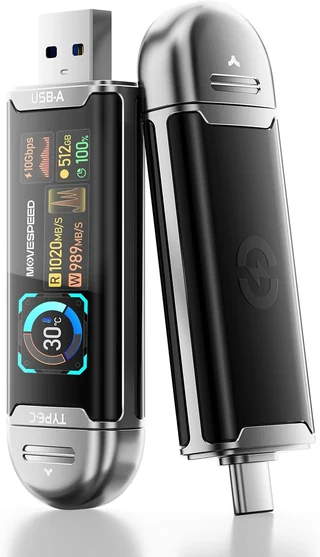
MOVE SPEED USB SSD stick with smart display, 512 GB
$649
Planned launch price. Before tax and shipping. One drive.
Recommended

Samsung T7 Shield portable SSD, 1 TB
$739
Planned launch price. Before tax and shipping. One drive.

Samsung T9 portable SSD, 2 TB
$949
Planned launch price. Before tax and shipping. One drive.
The pilot is limited to a small group of bookkeepers, accountants, and finance staff, who receive a price below launch pricing in exchange for a feedback call after 30 days. Each pilot includes the first 12 months of updates and a 30-minute onboarding session. The final package contents, compatible hardware, support terms, and return policy are confirmed with you in writing before you pay.
Join the pilot
Tell us about your work and your computer. We read every application and reply by email.
Bookkeepers, small practices, and fractional CFOs who serve several small-business clients are especially welcome. Have a question about your computer first? Use the compatibility form.
Included at no extra charge
For questions outside your client records, open General Chat from the dashboard sidebar. It is a general-purpose chat in its own tab, using the same local model, and it sees nothing from your client workspaces unless you paste it in. It is included with every Evolve AI edition.
We are inviting a small group of bookkeepers, accountants, and finance staff to use the pilot on real month-end work. Tell us about your practice, and we will follow up by email.