Agent
For listing agents and small teams.
- Facts read from a seller’s property sheet
- Listing packages and social posts
- Showing follow-ups, seller updates, offer news
- Summaries of disclosures, inspections, and contracts

Real Estate & Property Management Edition · Pilot program
A private workspace for independent agents, small property managers, and short-term rental owners. A local AI drafts from the facts you have verified, the app checks every draft against them, and leases, owner records, and negotiation notes stay on your computer. Draft as often as you need with no per-request AI fees.
Three showings today. A seller waiting for an update.
And a guest asking for the Wi-Fi password at 11 at night.
The Real Estate & Property Management Edition turns your property facts into finished work, with client details that stay on your computer.
Add the seller's property sheet, and the local AI reads out each fact with the exact words it came from.
You tick the ones you've checked.
Then it writes the listing: a description, highlights, three social posts, and a brochure summary, from verified facts only.
Anything your facts don't support is flagged before you publish.
The seller email and a printable fact sheet come from the same facts, so every detail matches.
Managing rentals? Turn a maintenance request into a task list and a vendor work order.
And send owners a monthly report, with every number calculated by the app.
For short-term rentals, guest messages come from your own approved answers.
And occupancy, daily rate, and turnovers are always one click away.
Leases, owner records, and negotiation notes stay on the drive you hold, and it works offline.
With no per-request AI fees.
The Real Estate & Property Management Edition pilot is open now, at a price below launch.
List faster, and keep every client detail private. Apply at evolveaigo.com.
The property workspace
Each property keeps its facts, contacts, documents, and drafts together. You enter or confirm the facts once, tick the ones you have verified, and every tool works from them, so the listing, the seller email, and the fact sheet always agree.
22 Alder Lane · verified facts
Drafted by the local AI, then checked
Built by the app, without AI
Three dashboards
Turn on the parts you use when you set up the workspace. Each has its own Home dashboard, and all three share the same properties, contacts, and documents.
For listing agents and small teams.
For property managers and landlords.
For hosts who run their own vacation rentals.

The five-step demo
This is the guided flow in the Listing Packages section, timed on the development computer with the fictional sample.
A seller questionnaire, a prior listing, or your notes, as Word, PDF, or text.
About 25 seconds. Each proposed fact shows the exact words it came from; tick the ones you have checked.
About 15 seconds for the description, highlights, three social posts, and a brochure summary.
About 6 seconds for the “your listing is live” email, signed with your details.
Instantly. Built by the app from verified facts, ready to save as PDF.


Listing packages
Choose the listing type (for sale, long-term rental, or short-term rental), a tone, and anything to emphasize. The local AI writes a headline, the description within your character limit, five to eight highlights, three social posts, and a brochure summary. Paste a current description to have it improved from your facts instead.
Before you see the draft, the app checks it:
Only verified facts go to the AI unless you choose otherwise, and private facts never do.

Add a seller’s questionnaire or your own notes, and the local AI proposes each fact with the exact words it came from. The app confirms the quoted words are really in the document and that numbers match the quote, so a misread year or an invented detail is marked for you to check. Nothing is saved until you tick it.
The printable fact sheet is assembled by the app from verified facts, with your brokerage and contact details, so every figure prints exactly as you entered it. Save it as PDF or Word.

Messages
You choose exactly which facts, contact details, and knowledge book entries go into each request, and you can preview what the AI will receive. Where the facts are silent, the draft leaves a visible placeholder such as [Needs: showings policy]. Nothing is ever sent: copy the reviewed draft into your email, text, or booking platform, or export it to Word or PDF.

Long-term rentals
For property managers and landlords with a few to a few dozen doors.
Log what the tenant reported, then ask the AI to suggest an ordered task list, including a step to confirm notice or permit requirements where they may apply. Draft the vendor work order, the tenant update, and the owner’s repair approval from the same request. When the work is done, record its cost in the property ledger with one click.

Import bank or accounting exports by property, or by a property column that names each row’s property. Rows that match no property are listed for you to fix. The expense analyzer totals spending by property, category, vendor, and month, and an owner report adds the maintenance completed and still open for the months you choose.
An optional cover note is written by the local AI from the report’s figures, and the app flags any figure in it that the report does not contain. Print the report, save it as PDF, or export it to Excel.

Short-term rentals
For owners who run their own vacation rentals, working from their own reservation exports.
Keep a knowledge book of approved answers for each property: Wi-Fi, parking, check-in and check-out steps, appliance how-tos, and house rules. Booking replies, arrival instructions, and answers to guest questions use only those entries. When an answer is not in the book, the draft says you will check and leaves a placeholder for you.
Door and lockbox codes are marked sensitive and stay out of every message and welcome guide unless you include them on purpose.

Import the reservations export from your booking platform or channel manager. The app spreads each stay across the months its nights fall in and reports occupancy, average daily rate, revenue per available night, and the operating result after the expenses in your ledger, by month and by channel. Cancelled bookings are kept and left out of the results.


Every check-out with the next arrival and the time between them, with same-day changeovers and overlapping bookings marked. Print a cleaning handoff with your property’s checklist.
See how nightly rate, occupancy, cleaning, and platform fees change the result for a month or a year, with break-even occupancy. Compare up to four scenarios side by side.
Average rating, recurring topics, and a summary of what guests value and what to fix, with every point citing the reviews it came from. Draft thoughtful public responses.

Privacy
Client correspondence, leases, owner financial records, unpublished negotiations, and guest access codes go only to software on your own computer. The dashboard has no cloud AI calls, no analytics, and no online account.
Once the drive is set up, every tool keeps working with Wi-Fi off. The dashboard and AI listen only at 127.0.0.1, the address of your own computer.
Showing instructions, seller motivation, and access codes are kept apart from public facts. Listing text never includes them, and messages include them only when you tick them.
Your workspace, with every property, contact, document, and draft, is one database file on the drive. A temporary workspace keeps nothing after the window closes.
Download a backup protected with a passphrase. Restoring makes a safety copy first. There is no passphrase recovery.
Easy to start and update
Double-click START-REAL-ESTATE on the drive, wait for Ready, and the dashboard opens in your browser. Open the fictional sample to see two listings, a duplex unit with a tenant and maintenance requests, and a lakeside cottage with bookings and reviews, kept only in memory. Sample import files are linked from every import screen.
One click in Settings & Privacy puts a folder named “Evolve AI” on your desktop, with a Start shortcut and tools to install an update, undo the last update, and add or repair AI models. Updates arrive as a file you save in your Downloads folder; the updater checks every file and keeps your workspace and settings.
Know the limits
Questions
No. It writes the drafts, and you paste the reviewed text into your MLS, listing site, email, or booking platform. That keeps a person in the loop for everything that reaches a client or guest.
From you: typed on the property page, or read from a document you add and confirmed one by one. Each fact carries a verified mark you set, and listings use verified facts only unless you choose otherwise.
Word, text, and PDF documents with selectable text, plus CSV and Excel exports from banks, accounting tools, booking platforms, and channel managers. A property column in an import is matched to your property names or short codes, and rows it cannot match are listed for you.
It works alongside it. Version 0.1 has no rent collection, tenant portal, or online booking sync. It covers the writing, organizing, and reporting around them, privately.
Pricing
Every drive includes one edition of your choice. Choose the Real Estate & Property Management Edition, then the drive it ships on. Add other editions to the same drive for $149 each.
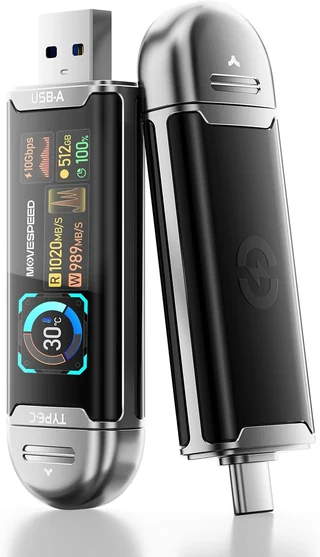
MOVE SPEED USB SSD stick with smart display, 512 GB
$449
One drive with one edition of your choice. Before tax and shipping.
Our most portable option: a solid-state USB stick with a built-in screen that shows free space, transfer speed, and temperature. It has both USB-A and USB-C plugs, so no cable is needed. MOVE SPEED advertises read speeds up to 1,090 MB/s.
Order this drive: Pocket with the Real Estate & Property Management Edition
Recommended
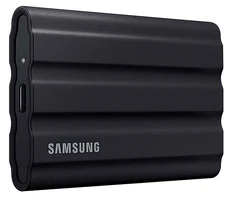
Samsung T7 Shield portable SSD, 1 TB
$579
One drive with one edition of your choice. Before tax and shipping.
A protective exterior with an IP65 water and dust resistance rating. Samsung includes USB-C and USB-A cables. A good fit for carrying between home, office, and campus. Samsung advertises read speeds up to 1,050 MB/s.
Order this drive: Rugged with the Real Estate & Property Management Edition
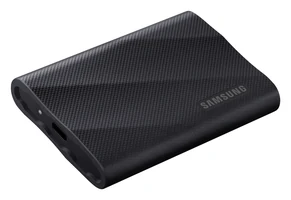
Samsung T9 portable SSD, 2 TB
$799
One drive with one edition of your choice. Before tax and shipping.
Twice the storage of Rugged, for keeping large document collections and exports on the drive. Samsung advertises speeds up to 2,000 MB/s, which requires a USB 3.2 Gen 2x2 port and cable.
Order this drive: Premium Storage with the Real Estate & Property Management Edition
The pilot is limited to a small group of agents, property managers, and short-term rental owners, who pay less than the regular price in exchange for a feedback call after 30 days. Each pilot includes a 30-minute onboarding session. As for every customer, bug and security fixes are free, and feature updates are $99 each. The final package contents, compatible hardware, support terms, and return policy are confirmed with you in writing before you pay.
Join the pilot
Tell us about your work and your computer. We read every application and reply by email.
Independent agents, managers with a few dozen doors or fewer, and hosts who manage their own vacation rentals are especially welcome. Have a question about your computer first? Use the compatibility form.
Included at no extra charge
For questions outside your properties, open General Chat from the dashboard sidebar. It is a general-purpose chat in its own tab, using the same local model, and it sees nothing from your workspace unless you paste it in. It is included with every Evolve AI edition.
We are inviting a small group of agents, property managers, and short-term rental owners to use the pilot on real work. Tell us about your business, and we will follow up by email.