Quotes and proposals
Describe the job in your own words. The AI drafts the scope, questions to ask, exclusions, and a cover message, and suggests line items priced from your saved services.

Small Business Edition · Pilot program
Quotes, invoices, money tracking, customer messages, marketing, and a business plan builder in one workspace. The AI runs on your own Windows computer from a portable drive, and the app calculates every number. Draft as much as you need with no per-request AI fees.
Everyday work
Designed first for independent service businesses such as cleaning, landscaping, contracting, and consulting. Plain language throughout, with no accounting or prompt-writing knowledge needed.
Describe the job in your own words. The AI drafts the scope, questions to ask, exclusions, and a cover message, and suggests line items priced from your saved services.
Convert an accepted quote into an invoice, record partial payments, and see what is outstanding and overdue. Corrections are recorded as reversals, so the history stays complete.
Import CSV or Excel files from your bank or card website, approve how each row is treated, and see where the money went.
Replies to inquiries, quote follow-ups, appointment reminders, project updates, invoice reminders, and calm responses to complaints, using only the facts you tick. Nothing is ever sent for you.
Service descriptions, social posts, newsletters, FAQs, promotions, and a monthly content calendar. No invented reviews, awards, or statistics; missing facts show as placeholders.
Task lists, weekly priorities, onboarding checklists, and procedure drafts, plus questions answered from your own documents with the passages cited, and spreadsheet totals calculated over every row.
Try a fictional sample business first: invented customers, a quote, an invoice, bank rows, and a plan, kept only in memory and never mixed with your records. When you are ready, a short interview sets up your business one question at a time.
Every number on the home page names its source, such as “issued invoices minus recorded payments.” The screenshot shows the fictional sample business on the development computer.

Quotes
Write your job notes the way you would jot them down after a walkthrough. The local AI drafts the written parts of the quote and suggests line items. Prices come only from the services and prices you saved; a line without a saved price stays marked Needs information until you type one.

Every amount is calculated by the app with exact decimal arithmetic, rounded to the cent. Nothing the AI writes can change a total. When a quantity or price is missing, the totals panel lists what is needed and shows no total at all.

Money and expenses
Export a CSV or Excel file from your bank or card website and import it. You confirm how the file is laid out, and every row is checked before anything is added.

Business plan builder
Choose Start a new business, Plan an existing business, or Improve an existing plan. A guided interview asks one question at a time; skip any question and come back later.
No plan made here guarantees funding, profit, or approval by a lender.

Privacy
Customer details, invoices, and bank rows go only to software on your own computer. The dashboard has no cloud AI calls, no analytics, and no online account.
Once the drive is set up, quotes, imports, reports, and plans keep working with Wi-Fi off. The dashboard and AI listen only at 127.0.0.1, the address of your own computer.
Each AI form shows which facts are included, and Preview the request shows the exact text sent to the local model. Instructions hidden inside your files are ignored.
Your business is saved on the drive in a database file, with safety copies made before updates and restores. A temporary mode keeps nothing at all.
Download a backup of your business protected with a passphrase of 12 or more characters. There is no passphrase recovery.
Easy to start and update
One click in Settings & Privacy puts a folder named “Evolve AI” on your desktop, with a Start shortcut for every edition on your drive and a tools folder for each: Install an update, Undo the last update, Add or repair AI models, and Read me.
To update, save the new update file in your Downloads folder and choose Install an update. The updater finds the newest update for your edition, checks every file, keeps your business records and settings, and saves the previous version so you can undo it.
Know the limits
Pricing
Every option carries the same Small Business Edition software, models, and dashboard. You choose the drive it ships on.
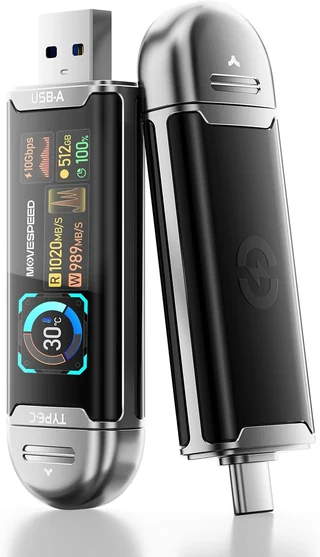
MOVE SPEED USB SSD stick with smart display, 512 GB
$649
Planned launch price. Before tax and shipping. One drive.
Recommended
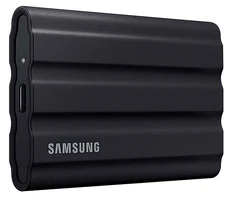
Samsung T7 Shield portable SSD, 1 TB
$739
Planned launch price. Before tax and shipping. One drive.
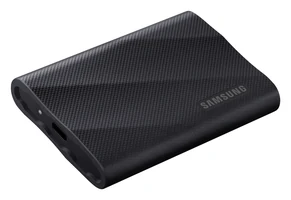
Samsung T9 portable SSD, 2 TB
$949
Planned launch price. Before tax and shipping. One drive.
The pilot is limited to a small group of business owners, who receive a price below launch pricing in exchange for a feedback call after 30 days. Each pilot includes the first 12 months of updates and a 30-minute onboarding session. The final package contents, compatible hardware, support terms, and return policy are confirmed with you in writing before you pay.
Join the pilot
Tell us about your business and your computer. We read every application and reply by email.
Cleaning, landscaping, trades, and independent consulting businesses are especially welcome, and so are owners planning to start one. Have a question about your computer first? Use the compatibility form.
Included at no extra charge
For questions outside your business records, open General Chat from the dashboard sidebar. It is a general-purpose chat in its own tab, using the same local model, and it sees nothing from your business unless you paste it in. It is included with every Evolve AI edition.
We are inviting a small group of business owners to use the pilot on real quotes, invoices, and records. Tell us about your business, and we will follow up by email.