Ads and promos
A hook, the offer, one reason to believe, and a clear call to action, in tall format for Reels, Shorts, and TikTok, or wide for YouTube and your website.

Video Studio Edition · Pilot program
Describe the video you need. A local AI plans every scene and writes the narration, a natural voice reads it, and captions and original music are added. Render as many as you like: no credits, no per-video fees, no subscription, and nothing is uploaded.
You know your business needs more video. An ad for the new menu. A how-to for customers. Training for the new hire.
But most AI video services charge every month, count your minutes, and upload everything you make.
Video Studio makes narrated videos on your own computer. As many as you want, with nothing uploaded.
Describe the video you need, and tick the pictures to use.
The local AI plans every scene and writes the narration in seconds, then checks it against your brief.
Every scene stays editable. Preview it exactly as it will render.
Drag across a screenshot to spotlight what matters, and the camera moves right to it.
Pick from 28 natural voices, American and British. Play every one before you choose.
Then press Render. This tall ad came out of Video Studio in under a minute, with captions and original music.
Wide for YouTube, tall for Reels and TikTok, square for feeds, or audio only, as an MP3.
It all runs on the drive you hold, and works offline.
No subscription, no credits, and no limit on how many videos you make.
The Video Studio Edition pilot is open now, at a price below launch.
Make the videos your business keeps putting off. Apply at evolveaigo.com.
Made with Video Studio
Each of these was planned, narrated, and rendered by Video Studio 0.1.0 on the development computer, from the fictional Maple Street Coffee sample that comes on every drive. Nothing was edited afterwards. Press play with the sound on.
On-hold phone message
Render times were measured on the development computer (Intel Core i9 laptop; the video is rendered on the processor). The business, offers, and photos are fictional; the photos were created for the sample with the local image engine.
Why it is different
Online AI video tools are convenient until the meter starts. Video Studio runs on the drive you hold, so the hundredth video costs the same as the first: nothing.
| Typical online AI video tools | Video Studio Edition | |
|---|---|---|
| Cost | A monthly or yearly subscription | One price for the drive. No subscription |
| How much you can make | Limited by minutes, exports, or credits in your plan | As many videos as you want |
| Your scripts and pictures | Uploaded to the provider’s servers | Stay on your computer |
| Internet | Required to make and download videos | Works offline after setup |
| Talking avatars and stock footage | Often included | Not included: videos are built from your pictures, screenshots, AI pictures, and text scenes |
How it works
Timed on the development computer with the fictional sample.
Choose what you are making and the format, write a sentence or two, and tick the pictures to use. Or open a Word, PDF, or text document.
About 10 to 15 seconds. The local AI writes every scene and its narration, and the app flags anything your brief did not say.
Listen to each line, see a live preview, drag a highlight across a screenshot, and change anything.
About a minute for a 30-second video. Download the MP4, captions for YouTube and Facebook, a transcript, and a poster image.


What you can make
Pick a starting point and the AI plans the scenes that kind of video needs. Every plan is a draft you edit.
A hook, the offer, one reason to believe, and a clear call to action, in tall format for Reels, Shorts, and TikTok, or wide for YouTube and your website.
Your screenshots, one step per scene, with the important part highlighted and the camera moving to it. Ideal for customer help pages.
Open a procedure, policy, or lesson and get a training video planned from it, with bullet scenes that build as the narration goes.
Products, a property tour, an event, or a welcome video for your homepage, with slow camera moves and a warm music bed.
New hours, a new service, or a policy change for customers, members, or staff, with the key date on screen.
On-hold messages, podcast-style segments, and narration as an MP3, with or without music.
Voices
Twenty-eight natural voices run on your computer, American and British, men and women. Here are eight of them reading the same line. Eric is the default; every workspace and every project can pick its own.
EricAmerican · male
Clear and even. The default voice.
HeartAmerican · female
Warm and expressive.
MichaelAmerican · male
Warm and steady.
BellaAmerican · female
Polished and energetic.
GeorgeBritish · male
Measured and authoritative.
EmmaBritish · female
Clear and composed.
PuckAmerican · male
Lively and upbeat.
SarahAmerican · female
Calm and clear.
If a voice says a name or a word wrong, add it to the pronunciation list once (“Nguyen” said as “win,” “GIF” as “jif”). Every preview and render uses it, and the captions keep your spelling.
“$1,299.99” is read as “1,299 dollars and 99 cents,” “50%” as “50 percent,” and “example.com” as “example dot com.”

Details that matter
Your colors, logo, and website on title and closing scenes. Text stays readable whatever colors you choose.
Most social video is watched without sound. Captions follow the voice sentence by sentence, and you also get .srt and .vtt files.
Four moods composed in code for each video, lowered automatically under the voice. Or use a music file you have the rights to.
Wide 16:9, tall 9:16, and square 1:1, each with its own layout, so text never ends up under the app buttons on a phone.
On computers with an NVIDIA graphics card, describe a picture and the local image engine paints it into your media library.
Plans are checked for prices, dates, days, and offers your brief did not mention, leftover placeholders, and repeated headlines.

Privacy
The AI that writes, the voices that speak, and the engine that renders all run on your computer. Nothing is uploaded and no account is needed.
Projects, pictures, and music live in one workspace file on the drive, and finished videos in a folder next to it. Unreleased products and internal training stay private.
Download a backup of the workspace, with your pictures and music, protected by a passphrase. There is no passphrase recovery.
Know the limits
Questions
Yes. There are no credits, minutes, or export limits. The only limits are your computer’s speed and the free space on the drive: a minute of 1080p video takes about 5 to 16 MB, depending on how much moves on screen.
Yes. The voice model is released under the Apache 2.0 license and the music is composed by the app for each video, so the videos are yours to use. Use only pictures and music files you have the right to use, and tell viewers when an AI voice could be mistaken for a real person.
Yes. Open a Word, PDF, or text document on the New video page, and the AI plans the lesson from what the document says, adding nothing it does not contain. You review every scene before rendering.
No. Videos render on the processor. An NVIDIA graphics card with 6 GB or more makes the AI writing faster, and is needed to create pictures with AI.
No. It is built for narrated videos from pictures, screenshots, and text scenes, the kind most small businesses, trainers, and schools need every week.
Pricing
Every drive includes one edition of your choice. Choose the Video Studio Edition, then the drive it ships on. Add other editions to the same drive for $149 each.
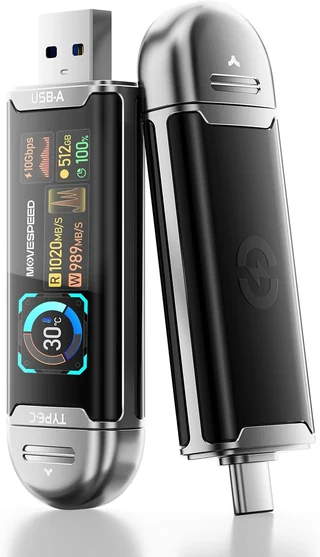
MOVE SPEED USB SSD stick with smart display, 512 GB
$449
One drive with one edition of your choice. Before tax and shipping.
Our most portable option: a solid-state USB stick with a built-in screen that shows free space, transfer speed, and temperature. It has both USB-A and USB-C plugs, so no cable is needed. MOVE SPEED advertises read speeds up to 1,090 MB/s.
Recommended
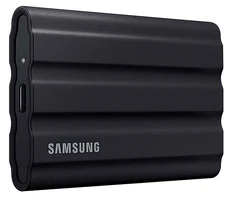
Samsung T7 Shield portable SSD, 1 TB
$579
One drive with one edition of your choice. Before tax and shipping.
A protective exterior with an IP65 water and dust resistance rating. Samsung includes USB-C and USB-A cables. A good fit for carrying between home, office, and campus. Samsung advertises read speeds up to 1,050 MB/s.
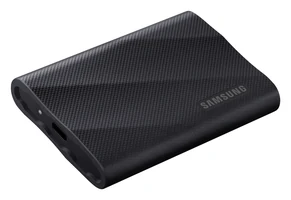
Samsung T9 portable SSD, 2 TB
$799
One drive with one edition of your choice. Before tax and shipping.
Twice the storage of Rugged, for keeping large document collections and exports on the drive. Samsung advertises speeds up to 2,000 MB/s, which requires a USB 3.2 Gen 2x2 port and cable.
Order this drive: Premium Storage with the Video Studio Edition
The pilot is limited to a small group of businesses, trainers, schools, and creators, who pay less than the regular price in exchange for a feedback call after 30 days. Each pilot includes a 30-minute onboarding session. As for every customer, bug and security fixes are free, and feature updates are $99 each. The final package contents, compatible hardware, support terms, and return policy are confirmed with you in writing before you pay.
Join the pilot
Tell us what you would make first and what computer you use. We read every application and reply by email.
Small businesses, trainers, schools, and nonprofits are especially welcome. Have a question about your computer first? Use the compatibility form.
Included at no extra charge
For questions outside your videos, open General Chat from the dashboard sidebar. It is a general-purpose chat in its own tab, using the same local model, and it is included with every Evolve AI edition.
We are inviting a small group of businesses, trainers, schools, and creators to use the pilot on real work. Tell us what you would make first, and we will follow up by email.